DreamFace: Generation of 3D Faces under Text Guidance
DreamFace: Progressive Generation of Animatable 3D Faces under Text Guidance
0. Abstract
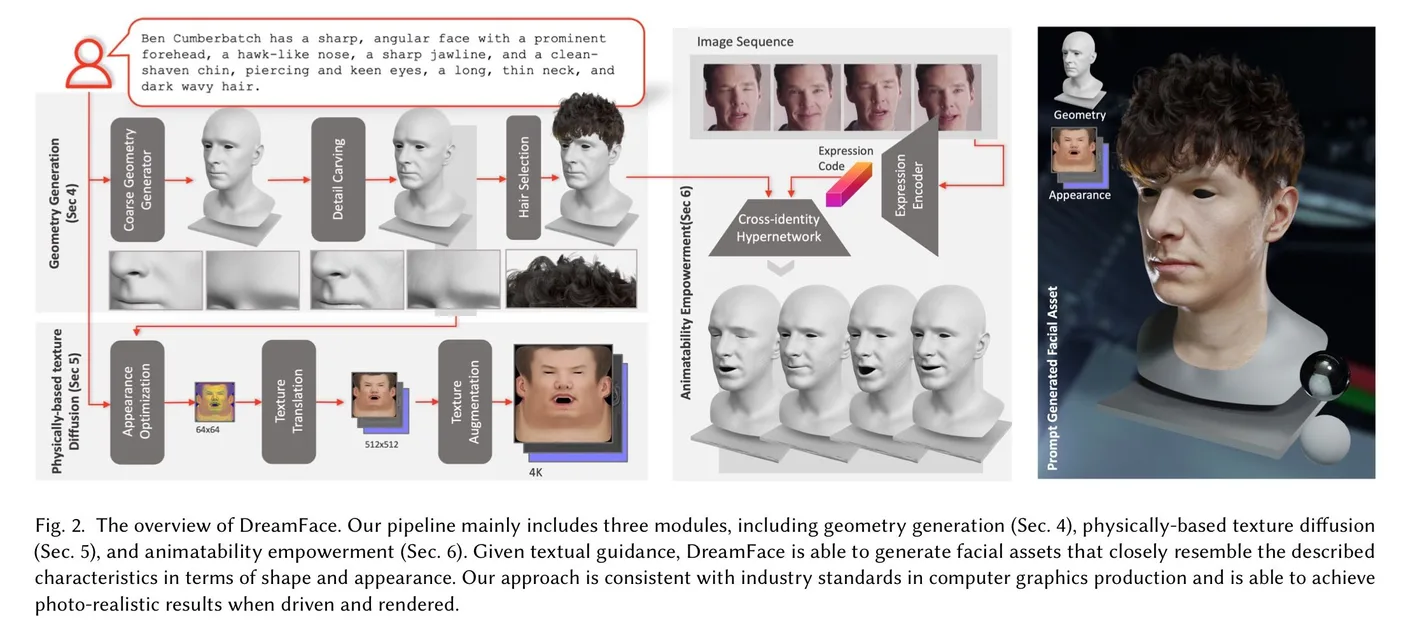
This paper introduces DreamFace, a text-guided method for generating 3D faces. It uses consistent formats for shape, texture, and animation so that assets work in practical CG tools such as Blender and Maya. The key point: Results can be used directly in professional 3D asset workflows!
Details
First, it introduces a coarse-to-fine scheme for generating neutral facial geometry with a unified topology. A selection strategy in CLIP embedding space produces coarse geometry, then score distillation sampling (SDS) optimizes displacement and normal maps.
Second, it introduces a dual-path mechanism for neutral appearance generation. A general LDM is combined with a new texture LDM to provide both diversity and texture specificity in UV space. Two-stage optimization, applying SDS in latent and image space, supports fine-grained synthesis. It also learns mappings from latent space to physically based textures: diffuse albedo, specular intensity, and normal maps.
1. Introduction
A 3D digital-human creation tool should let users customize skin color, hair, facial shape, expressions, and more. It should also produce natural results, apply consistent themes matching films or novels, and be simple enough for beginners to use through text. Film studios, game companies, and more recently the metaverse create considerable demand. Earlier 3D generation research, however, lacked diversity or detail.
To produce high-quality, easily controlled results, DreamFace uses a progressive framework with three sequential modules.
Geometry Generation: Selecting and refining a mesh
- First, geometry generation uses a coarse-to-fine scheme to create neutral faces with ICT-FaceKit topology. In the coarse stage, it scores text against 2D renderings of geometry candidates sampled from ICT-FaceKit in CLIP embedding space. It selects the best coarse geometry, then refines the details.
Physically-Based Texture Diffusion: Generating textures
- Second, as in DreamFusion, SDS learns displacement and normal maps. Physically based appearance generation then creates a facial asset matching the geometry and prompt. A dual-path mechanism uses two diffusion models: a general LDM for strong prompt-driven generation and a new texture LDM for high-quality textures in UV space. To train the latter, the authors expand existing UV datasets with their own data and prompt-tuned versions of other datasets. The resulting diffuse albedo, specular intensity, and normal maps can be upscaled to 4K using a super-resolution module.
Animation Empowerment: Optimizing animation
- A straightforward way to animate the neutral geometry and appearance is to use ICT-FaceKit's default blendshapes, since the topology is shared. To improve quality and expressiveness, the paper uses a cross-identity hypernetwork to learn a universal prior over the generated assets' expression spaces. This prior trains a video facial tracker as an encoder, enabling video-driven animation.
4. Geometry Generation
Given a user prompt describing facial features, the method finds the shape with the best CLIP matching score. The ICT-FaceKit topology contains 14,062 vertices and 28,068 faces. SDS loss then guides fine-grained detail carving. Stable Diffusion's image autoencoder is used, with encoder and decoder .
In short, this process selects the existing mesh that best matches the prompt, then refines it.
4.1. Coarse geometry generation
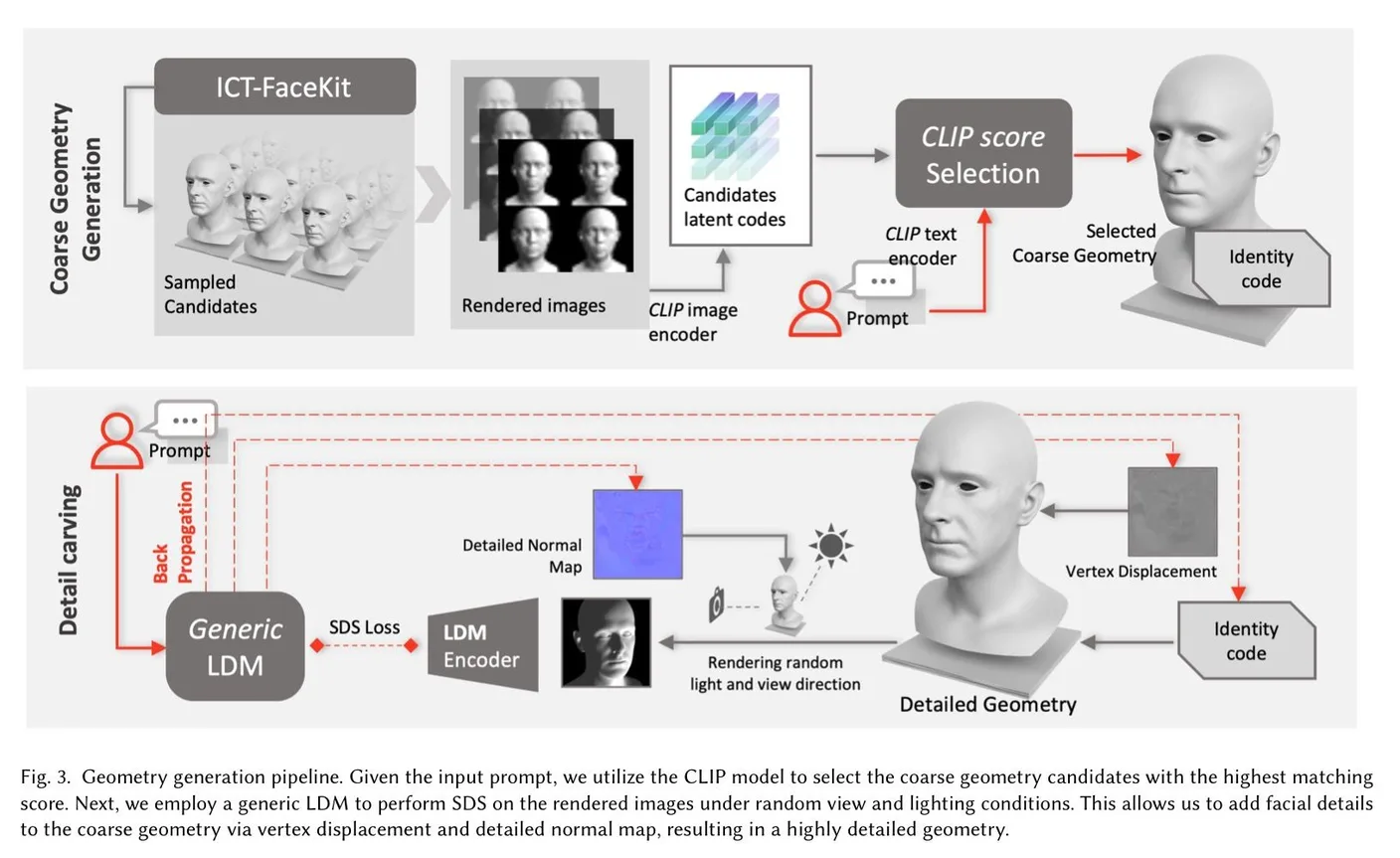
To sample candidates from ICT-FaceKit, it obtains a shape space with bases. The formula below generates a shape: is the mean face, the shape components, and the generated head mesh. Coarse candidates are sampled from this space using .
Details
To select the best candidate, each geometry is rendered from the front and left/right three-quarter views under ten lighting directions, producing 30 images per candidate. The images and prompt are then embedded with CLIP and their matching score calculated.
Given candidate , parameters , mesh , three camera poses , ten lighting conditions , and mesh renderer , rendering is expressed by , yielding images . The images are embedded with CLIP's image encoder , as follows.
Text is embedded by . Rather than directly correlating and , the method uses the calculation from AvatarCLIP below. is the normalized value of , applies, and is the anchor embedding.
The coarse geometry with the highest matching score is , with corresponding identity code .
4.2. Detail Carving
A detail-carving process brings the geometry closer to the prompt. For , vertex displacement lets correct the geometry, while normal map lets add details such as wrinkles.
Details
For the selected coarse geometry, detailed geometry is expressed as follows.

Here, denotes vertex normals and ⊙ is element-wise multiplication. The corrected mesh, with vertex displacement added, is rendered with camera pose and lighting direction as follows.

is a differentiable renderer. For rendered image , the SDS loss is as follows.

Regularization terms are added to the SDS loss to keep the generated details plausible, as shown below.

The final optimization is as follows.

This detail-carving process produces detailed geometry closely matching the input prompt. See the paper for more detail.
My current problem already provides a mesh, so selecting the best existing mesh is not particularly necessary. I have therefore covered this part only briefly.
4.3. Hair Selection
Hair is selected similarly to facial geometry. The geometry-generation process uses a dataset of sixteen professionally designed hairstyles and finds a hair color matching the prompt.
5. Physically-based Texture Diffusion
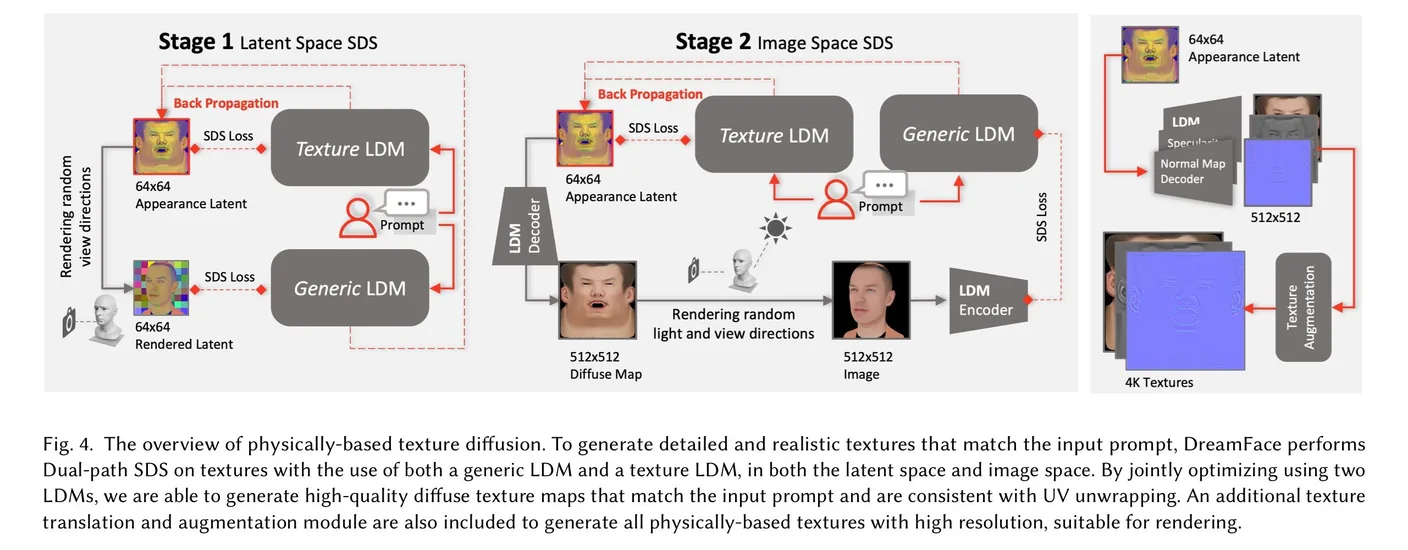
This section adds appearance controlled by diffuse, specular, and normal maps to the detailed geometry. Besides reflecting the prompt, consistent texture maps—UV-unwrapped in this paper—are essential to a CG pipeline. The authors therefore propose a dual-path approach using a general LDM and a texture LDM.
For more efficient appearance generation, they introduce two-stage optimization using SDS in latent and image space, inspired by Latent-NeRF.
5.1. Learning diffusion model in texture space
Ultimately, the paper collects UV-unwrapped textures and trains Stable Diffusion on them. The important questions are how these textures were collected, preprocessed, and used for fine-tuning.
5.1.1. Data Collection
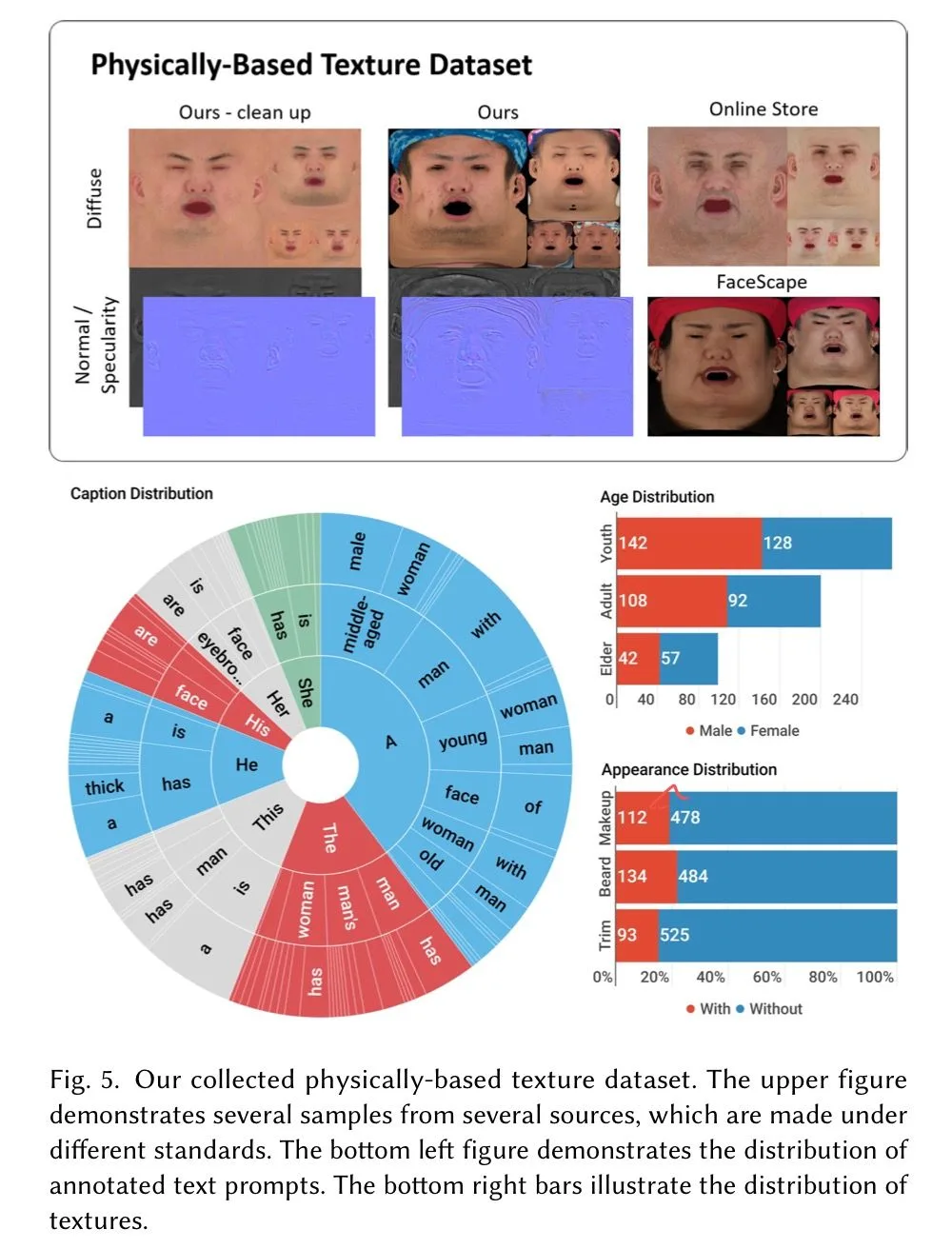
The data includes:
- Facial scans captured by the authors.
- Commercially available data.
Three sources are used. Their formats, UV layouts, and lighting differ, so professional artists and researchers on the team manually unify and annotate them. Hair, hats, marker points, and other non-face regions can destabilize training, so they are masked using , a face-color detection model. These regions are zeroed before being passed to the LDM.
5.1.2. Prompt Tuning
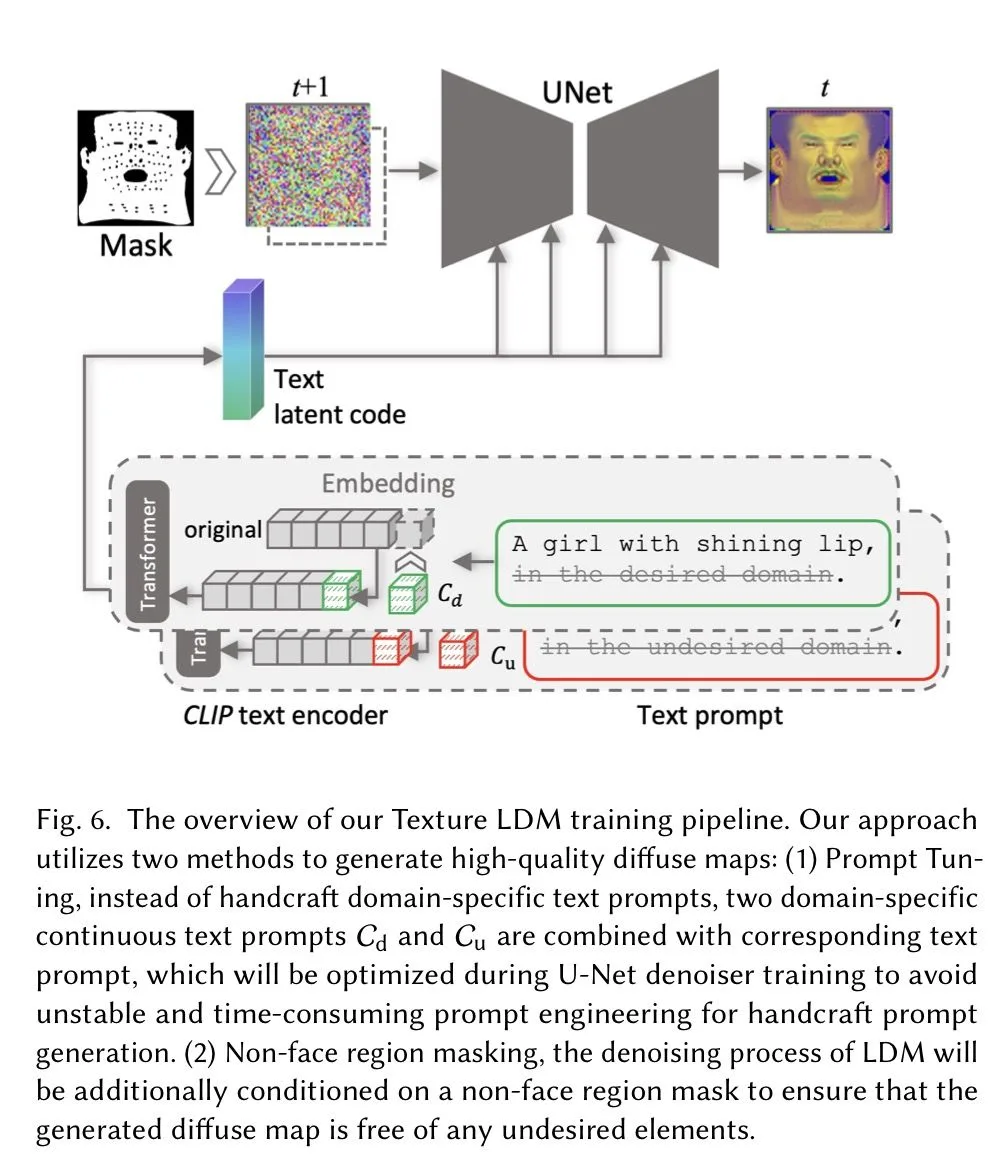
Some textures contain lighting, so the authors divide them into desired domain and undesired domain , using text conditions to distinguish them. Fine-tuning uses the loss below. Essentially, this is training Stable Diffusion on a carefully assembled texture dataset.

5.2. Two-stage Dual-path Appearance Optimization
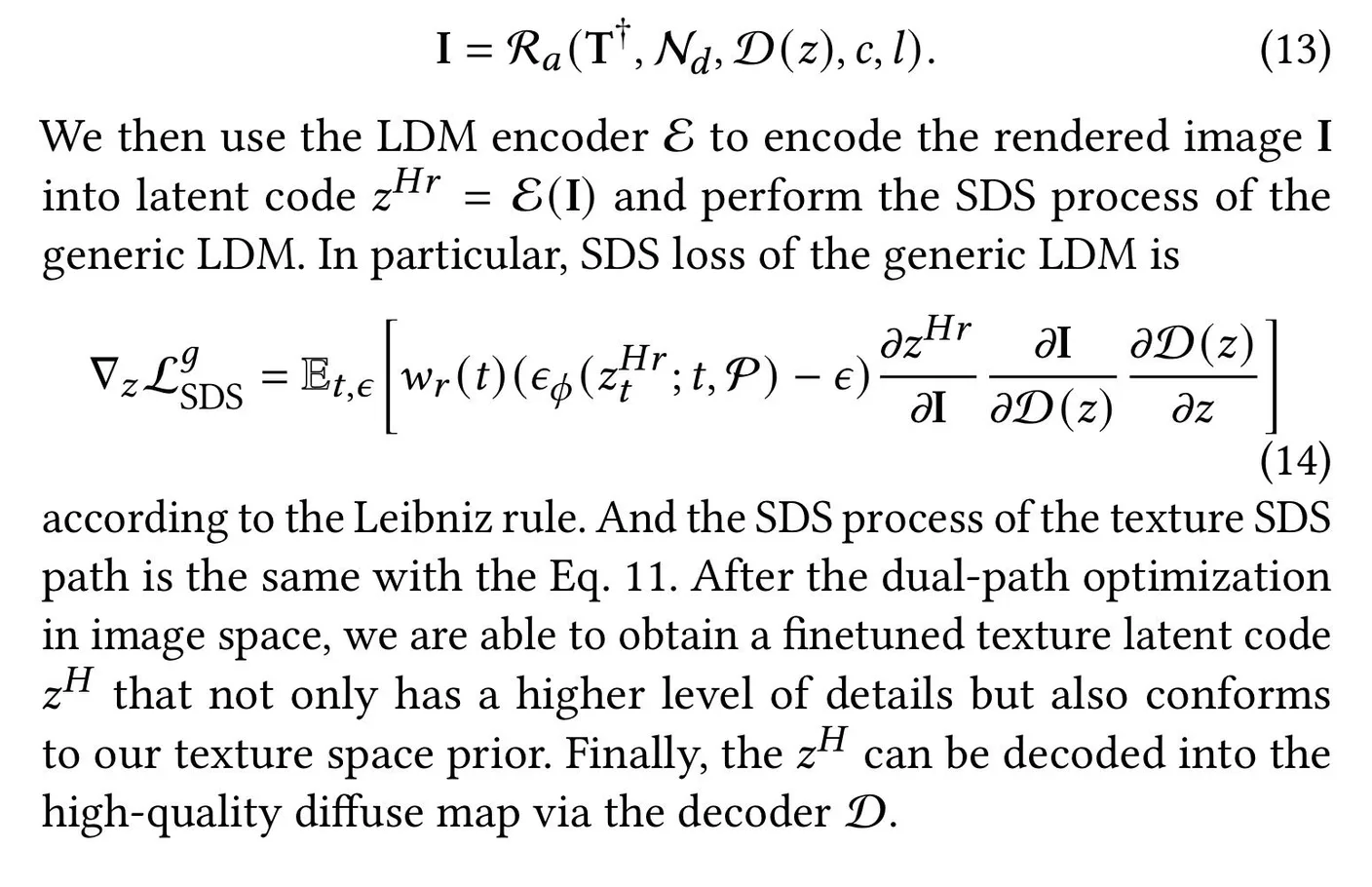
The process has latent-space SDS and image-space SDS stages, as follows.
Latent space SDS
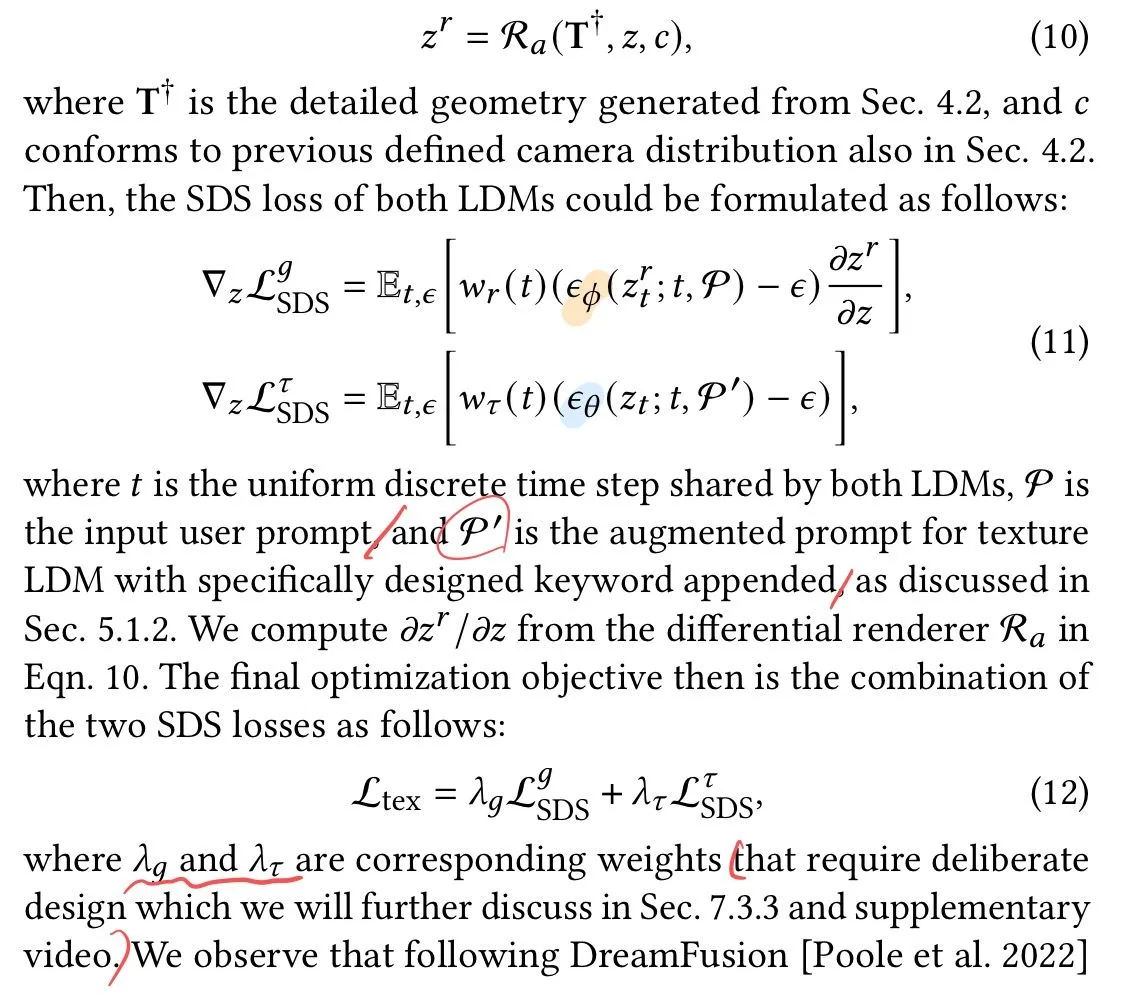
Image space SDS
5.3. Physically-based textures generation
Specular and normal maps are generated from texture U_d through an image-to-image method with the loss below. is Stable Diffusion; and decode specular maps, while decodes normal maps. These are trained on the authors' collected dataset.

The 512×512 textures are then upscaled to 4K with ESRGAN.
6. Animatability Empowerment
- Please refer to the paper.
7. Experiment
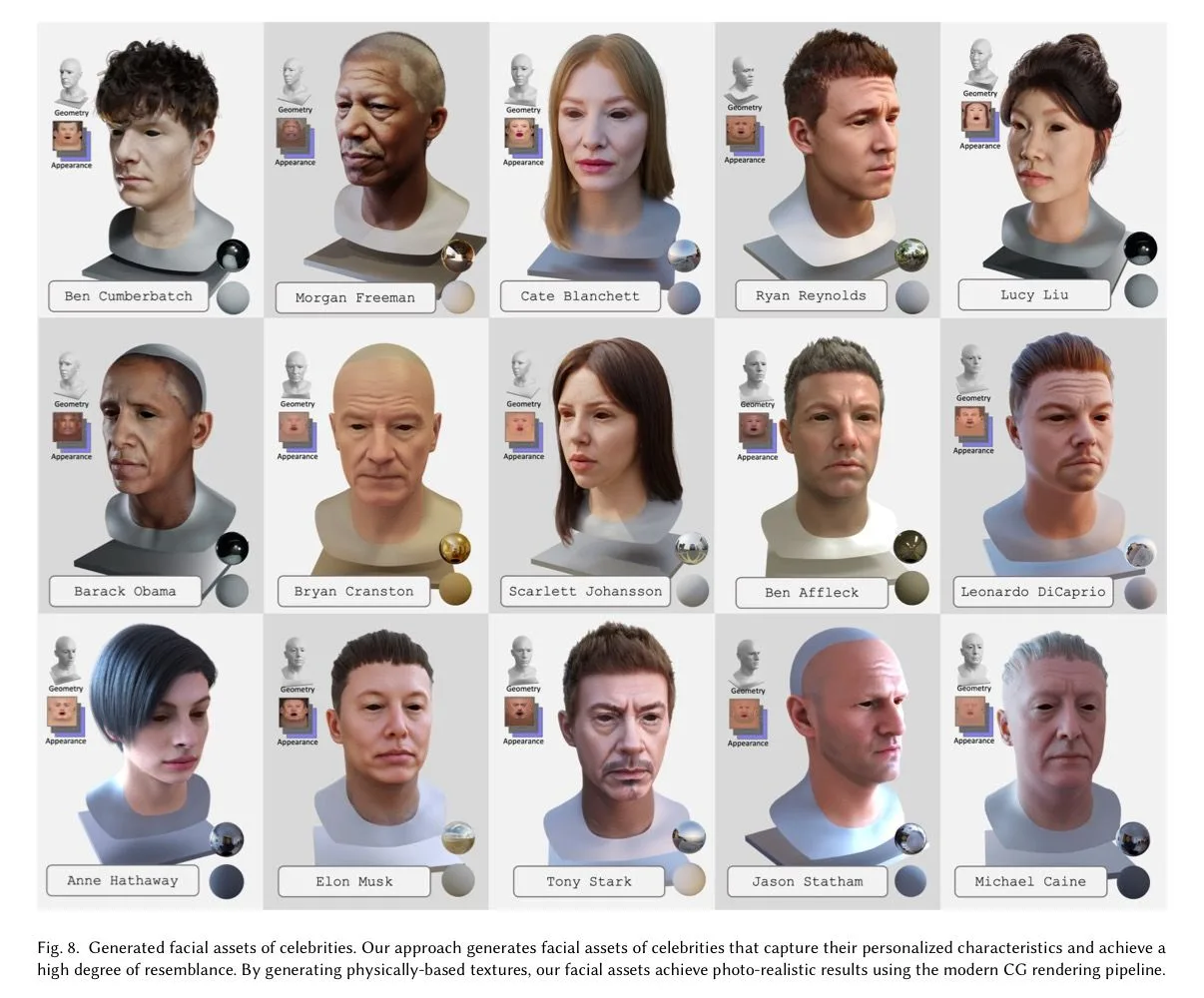
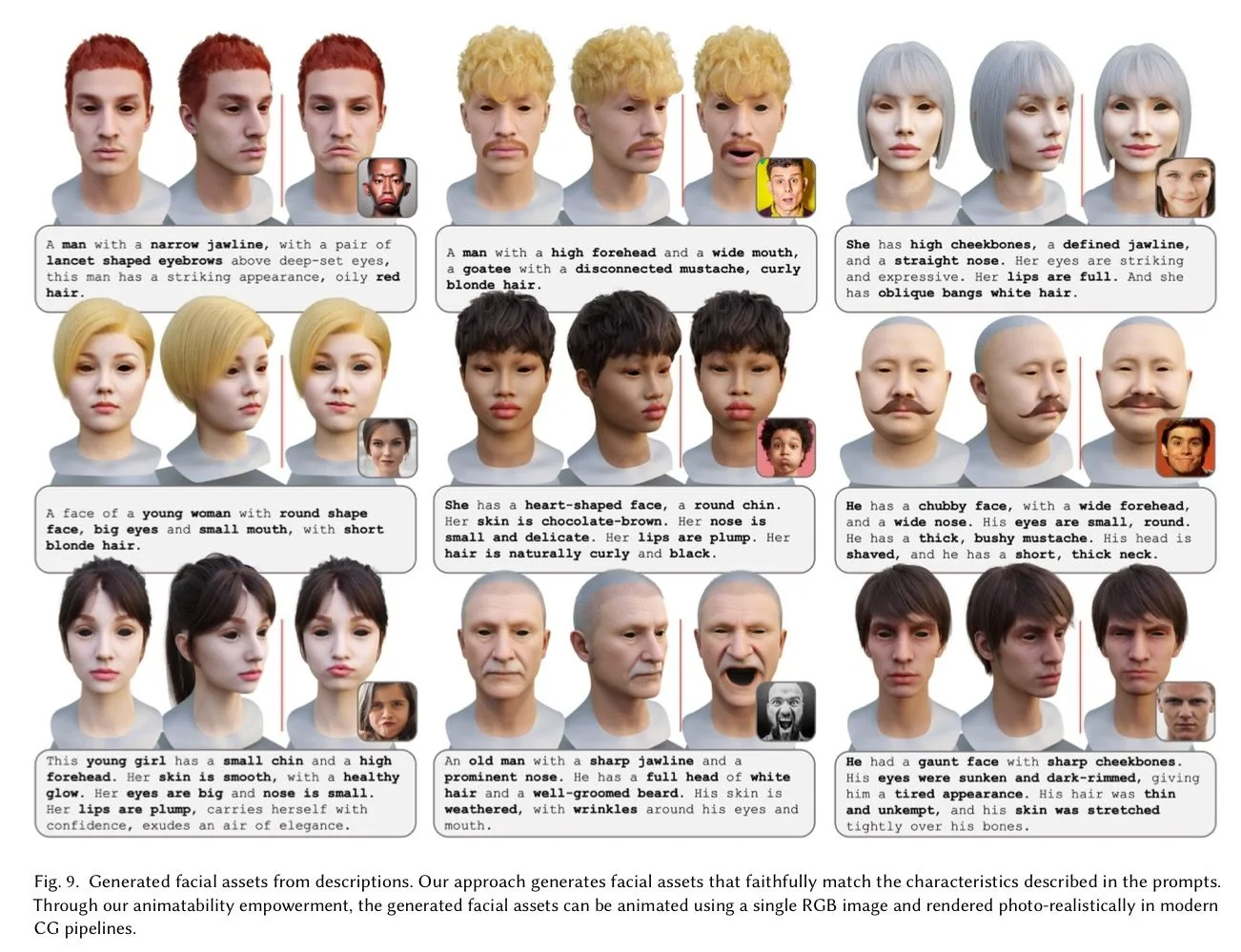
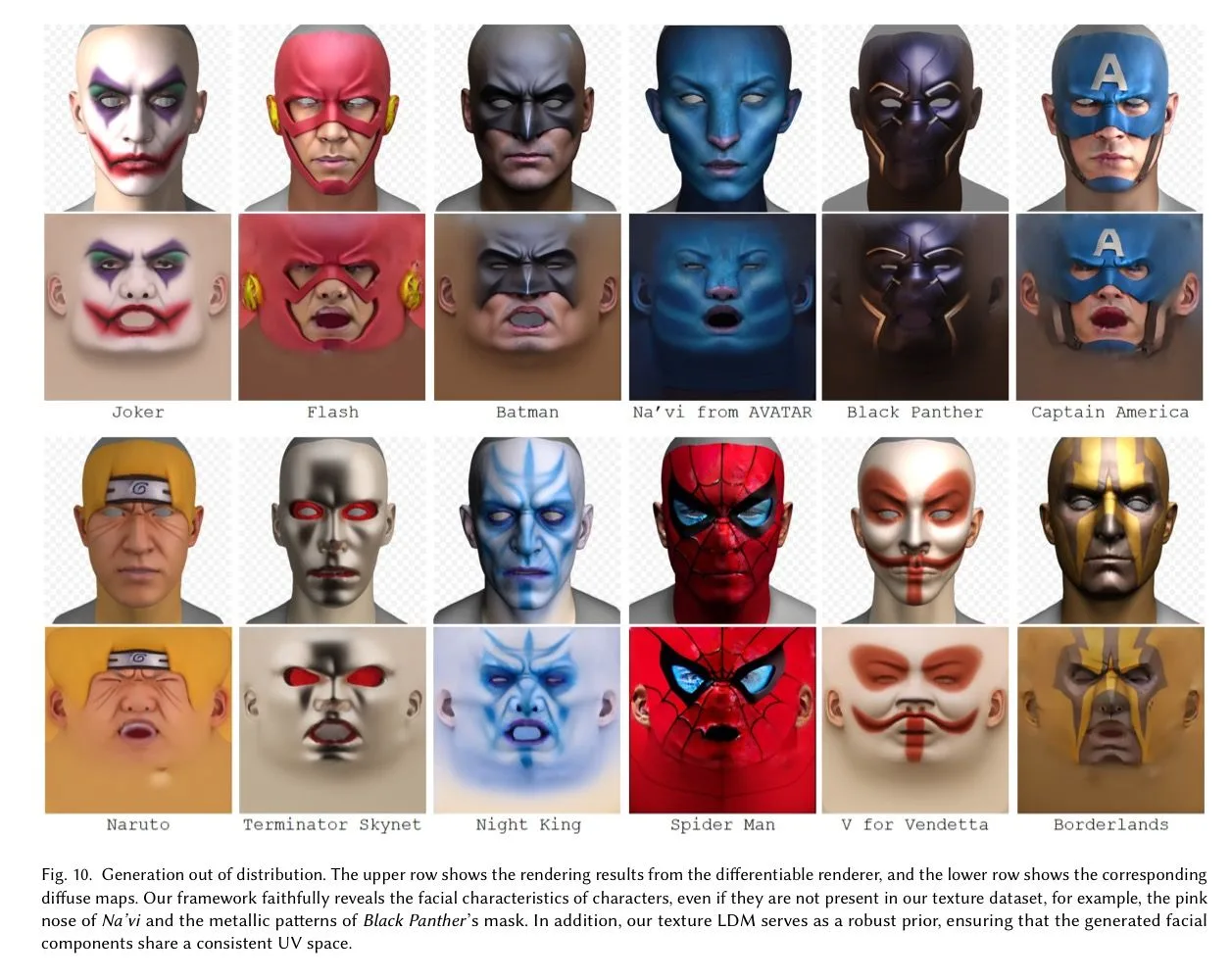
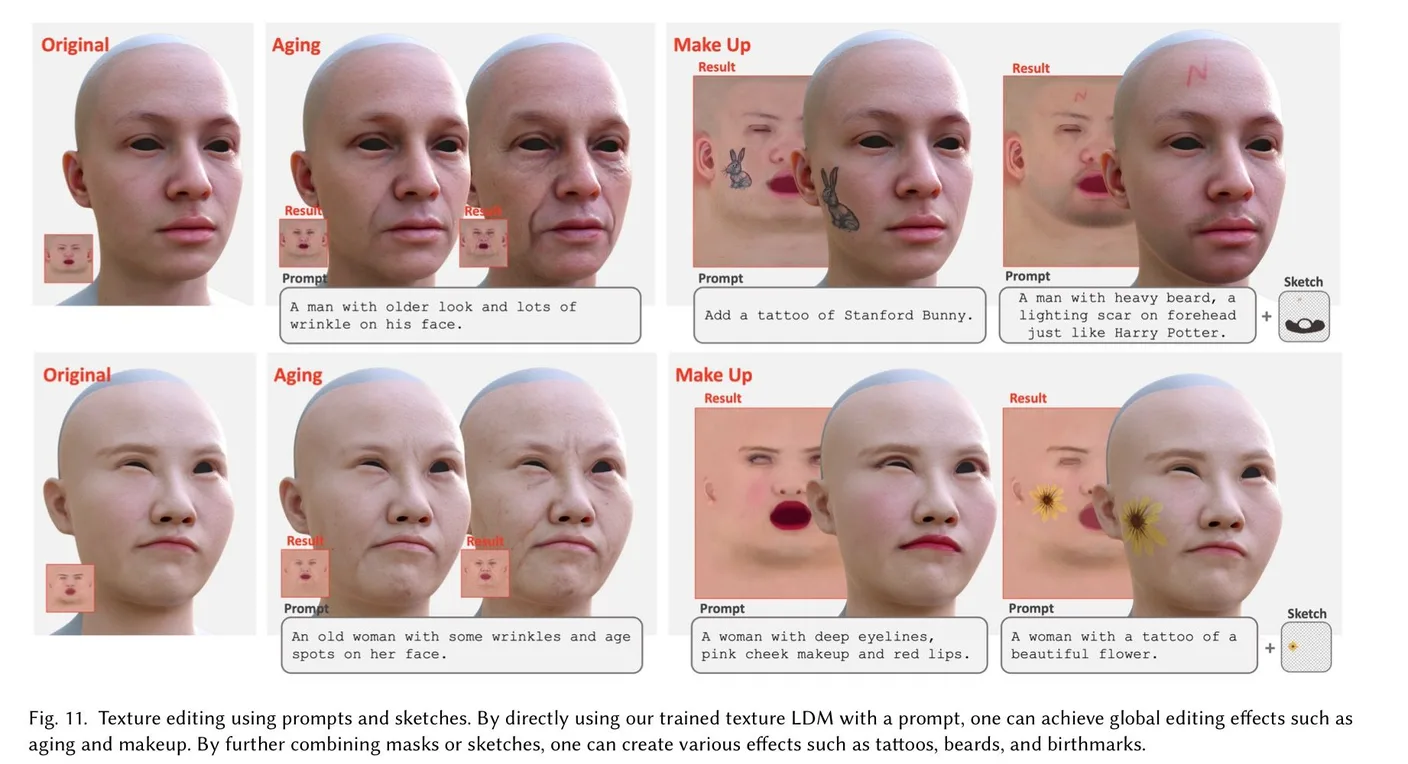
- The results do look good, although some cherry-picking may be involved.
Personal thoughts
- Collect UV textures, preprocess them carefully, and fine-tune Stable Diffusion—is that essentially it?
- Neither the model nor the data is released, so only the website demo is available. It does not seem to support hair or stylized characters, and the faces seem rather similar.
- A paper about training Stable Diffusion on MetaHuman textures and putting it to use.
Comments —